Github Action is an Awesome CI/CD Tools For Your Personal Projects


بسم الله الرحمن الرحيم
Hello,
You know what sadness is? it's when you realize that the CI/CD tool that you've used mostly was going to be closed source & pay-walled.
Yes, TravisCI, I'm talking to you.
To be fair, last time I checked, Travis CI has a "Free Trial" version that gives you a maximum of 10k credits. If you don't know, credits are like a "currency" that is drained whenever a CI/CD job is running.
The thing is, that 10k credits are not renewable. If it goes to 0, then you need to pay. How much? well, the cheapest price is $69 per month! What a great deal.

As a developer with an average wallet from a developing country, of course that's gonna be a problem for me. Because I only have a budget to rent a VPS to host my personal projects.
You may ask,
Isn't CI/CD for personal projects a bit overkill?
The answer is, yes... you're correct!
But the reason why I did this was of course because of the learning purpose & can be a plus point to my clients.
I tried using Jenkins before because it's free & open source, but the thing is I still need to grab my wallet to rent another VPS just to host it.
Why rent another VPS ?
Yeah technically I can just shove it into my current VPS, but doing so requires me to upgrade the RAM, hence more money needs to be spent.
Don't get me wrong, Jenkins is an awesome tool for automation. It's just I'm looking for something free & ready to use without pulling my hairs off because of some initial engine setup jankiness.
Then I stumbled upon CircleCI, they have a free tier, but there was some bug that made me can't set up a GitHub Deployment Key on their console.
Then, because I'm using Github for most of my personal projects, I remembered that Github has something called "Github Actions". Firstly I didn't know what that was & I gave it a try for my Blog's CMS Application.
Well, turns out it's pretty good

Github Action Introduction
So, to use GitHub action, what you need to do is:
- On the root folder of your repo, create
.github/workflowsdirectory - in
workflowsdirectory, create a.ymlfile and name it anything you want. - Add the following code
name: learn-github-actions
run-name: ${{ github.actor }} is learning GitHub Actions
on: [push]
jobs:
  check-bats-version:
    runs-on: ubuntu-latest
    steps:
      - uses: actions/checkout@v4
      - uses: actions/setup-node@v3
        with:
          node-version: '14'
      - run: npm install -g bats
      - run: bats -v
- Commit the changes & push it
What does it do ?
let's just focus on on: [push] & jobs property
on: [push] means that the job will trigger whenever there's a push action to any branches.
jobs property has 1 job called check-bats-version. You can rename this whatever you want. And it can be specified more than 1 job. So you can do multiple jobs that fits your requirement.
check-bats-version job uses ubuntu machine, and do these things:
- Checkout to the branch. This is mandatory action in order for the job to be able to do something with the repo.
- Install NodeJS version 14.
- Then install
batsnpm package globaly. It doesn't matter what that is at this point of time. - Check the version of the bats package.
After you commit & push it, Go to "Actions" tab in your github repository

And then, you will see learn-github-actions workflows on the left menu
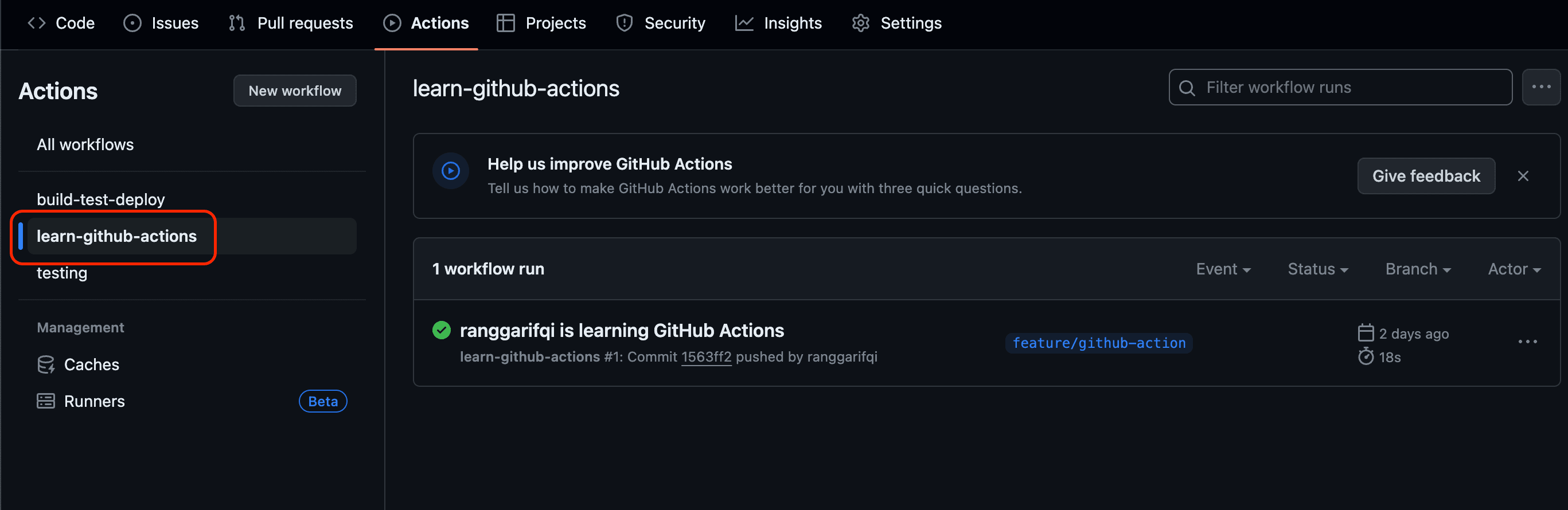
You can click on it and see the detailed flow of what it does.
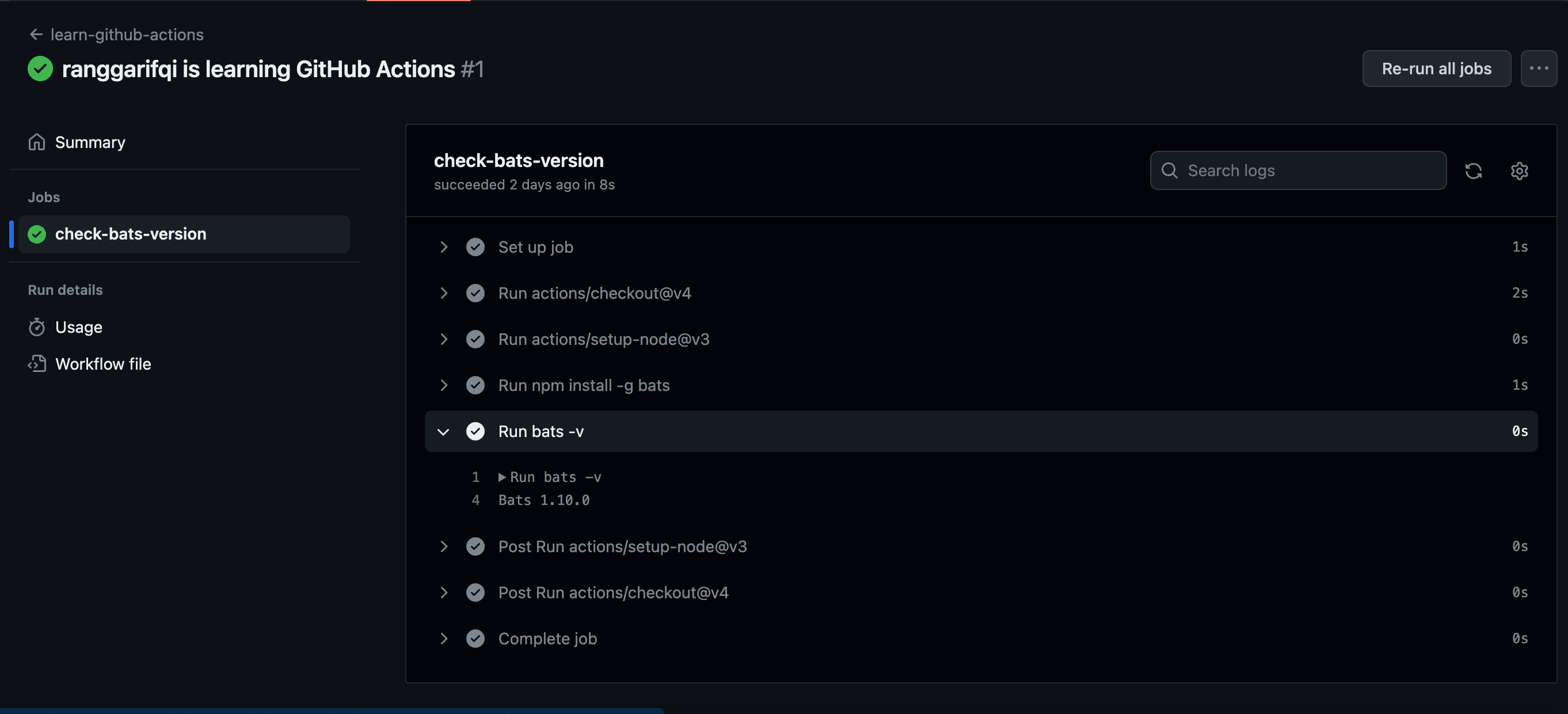
So, what's the point ? It's just showing a useless info
I'd say, think about other posibility that can be done by using this "Automation". We can do a lot of different think other than just printing a package version.
The most common thing that we can do are:
- Automated Testing on Pull Requests before it's able to be merged to the main branch (Continuous Integration)
-
- If the test is failing, then we can't merge to the main branch. This is to prevent buggy or malicious code to be merged to the main branch.
- Automated Testing & Automated Deployment after some branch has been merged/pushed to the main branch (Continuous Deployment)
-
- If the test is failing, then we don't deploy.
Conclusion
So, the reason why i chose Github Action for my personal project is because i used github, and it's free.
On github free tier, It gives us 2000 CI/CD minutes per month. Yes, it's renewable for each month. So I'd say Github is really generous here.
Next article, i'll try to cover the github action script that i used to setup Continuous Deployment for my blog's CMS app so that you have a real world example on how to use this CI/CD tools.
Alright then, see ya!
الى اللقاء
References: